Roam SL


Overview
Overview
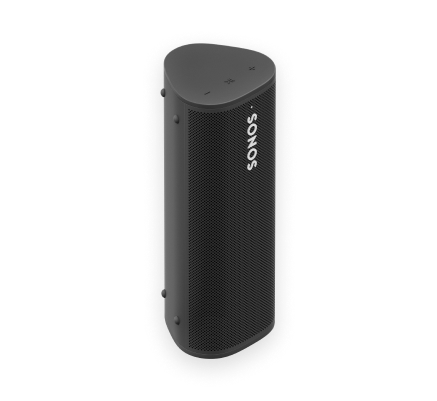
The ultra portable speaker for businesses—
- Up to 10 hours of continuous playback on a single charge.
- Lightweight, durable, waterproof design is ideal outdoor listening.
- Stream content over WiFi or Bluetooth®.
- Control your Sonos Pro system using the Sonos S2 app or the dashboard.
- See Getting Started when you’re ready to add Sonos Roam SL to your Sonos Pro system.
Controls and lights
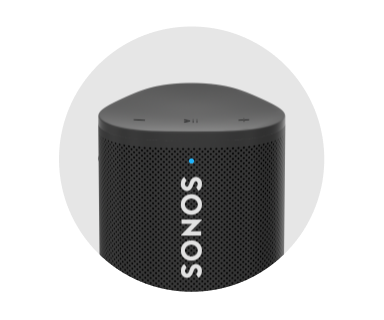 | Status light | Displays Sonos Roam SL's connection to WiFi or Bluetooth, indicates when the volume is muted, and signals errors:
|
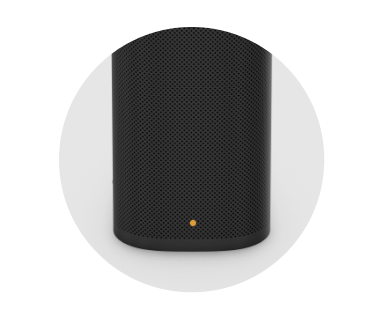 | Battery light | Indicates the battery status:
Battery Saver—To save battery life, you can set Roam SL to power off automatically instead of going to sleep. Go to Note: Sonos Roam SL's remaining battery life is always visible in the Sonos app. |
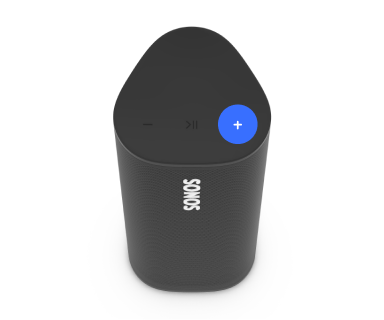 | Volume control |
Press and hold to quickly change the volume. Note: You can also use the Sonos app to adjust volume. |
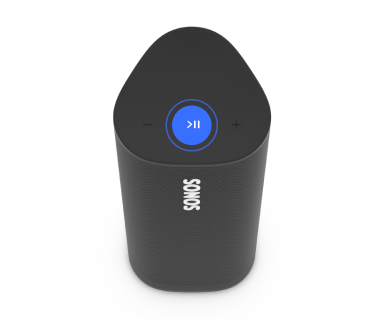 | Playback control |
Note: You can’t skip forward or go back when listening to a radio station. |
Note: If you don’t want to allow playback or volume adjustments using the speaker touch controls, you can disable them in the Sonos app.
Connector panel
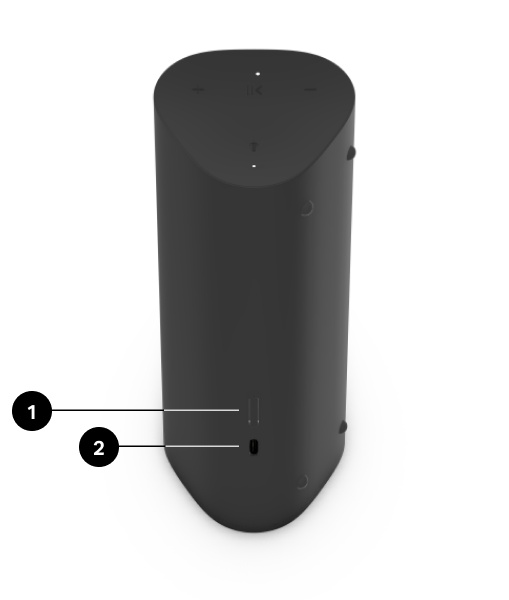
1 | Power/Bluetooth button | Power on/sleep/wake: Short press (less than 1 second) When you put Roam to sleep, you’ll hear a quick tone and the status light will turn off. Press again to wake. If you put Roam to sleep, it will stay asleep for 10 minutes before powering off. Bluetooth: To pair with a device, press and hold until you hear the second tone and the status light blinks blue, then select Roam from your device’s Bluetooth pairing list. To pair with a different device, wait until Roam connects to the current device, then press and hold again to restart the pairing process.
Press and hold until you hear the third tone. The status light blinks blue, then turns off. |
2 | USB-C port | Use the included cable to connect a compatible 7.5W minimum (10W recommended) USB-A power source. (Sonos 10W USB Power Adapter sold separately.) |
Select a location
You can use Sonos Roam SL just about anywhere. For maximum performance, here are a few guidelines:
- You can place it next to a wall or on a shelf—for best performance, leave at least 1" (2.5 cm) of space around the back of the speaker.
- Silicone end caps protect from drops or bumps.
- Avoid placing it in direct sunlight.
- Place the speaker horizontally or vertically. When vertical, it takes up barely any room. Position it horizontally for added stability on uneven surfaces.
Set up stereo pair
Pair two Sonos speakers in the same area for a wider, stereo experience. One speaker serves as the left channel and one serves as the right channel.
Note: The Sonos speakers in a stereo pair must be the same type (i.e. a pair of Ones or One and One SL).
- Place the speakers 8' to 10' (2.4 m to 3 m) apart. The listening position should be 8' to 12' (2.4 m to 3.6 m) from the paired speakers—less distance increases bass, more distance improves stereo imaging.
- Go to
 > System.
 - Select one of the speakers to use in the stereo pair, then select Set Up Stereo Pair to get started.
Charging
USB-C to USB-A | Use the included cable to connect a compatible 7.5 W minimum (10 W recommended) USB-A power source. (Sonos 10 W USB Power Adapter sold separately). Note: Battery life is visible in the Sonos app. | 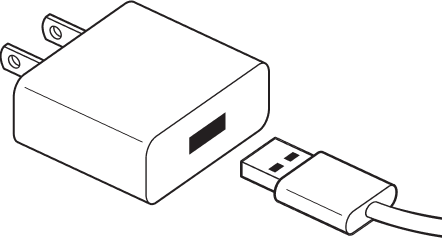 |
Sonos Wireless Charger (sold separately) | Place the speaker on the smooth, magnetized side of the charger for easy recharging—no extra wires or cables needed. | 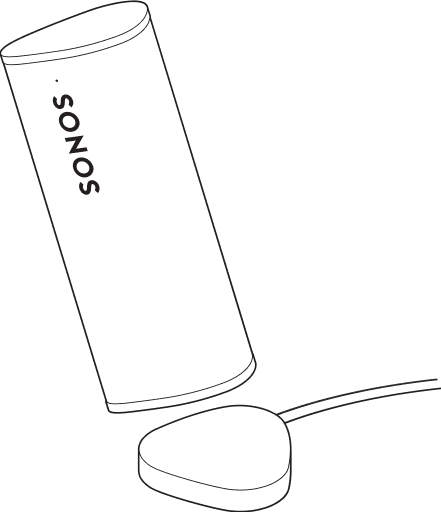 |
Qi charger | Place the speaker on a compatible Qi-certified wireless charger. |  |
Product settings
You can customize Sonos products using the Sonos app.
- Go to Settings
 .
. - Select a product.
| FEATURE | DESCRIPTION |
|---|---|
Product Name | If you move your speaker to a new spot, you can change its name in Settings. |
EQ | Sonos products ship with preset equalization settings. You can change the sound settings (bass, treble, balance, or loudness) to suit your personal preferences. Learn more |
Trueplay | Trueplay adapts the sound for your surroundings and content. Portable products can tune themselves automatically. Learn more |
Volume Limit | You can set a maximum volume for each product or set. Learn more |
Battery Saver (portable products only) | Set your portable speaker to power off automatically instead of going to sleep. It won't appear in the Sonos app until it’s powered back on. |
Line-In (Enable in Global Settings) | When a projector, turntable, stereo, or other audio device is connected to a Sonos product, you can adjust these line-in settings:
|
Idle Auto-Disconnect | When enabled, the speaker automatically disconnects from Bluetooth after 30 minutes of inactivity, only when it's also connected to WiFi. |
Status Light | Displays the speaker’s connection to WiFi, indicates when the volume is muted, and signals errors. Learn more |
Touch Controls | You can disable the touch control on your speaker. Do this to prevent accidental playback or volume adjustments (recommended for Sonos Pro users). Learn more Note: This setting also turns off Sonos Roam's controls. |
Turn off WiFi (not available for portable products) | You can turn off your speaker’s WiFi when it’s connected to your network with an Ethernet cable. This reduces power consumption and can improve connectivity for some wired speakers. |
Bluetooth pairing
- Make sure Bluetooth is enabled on your device.
- Press and hold the power button until you hear the second tone and the status light blinks blue (about 2 seconds). Then, select Sonos Roam from your mobile device’s Bluetooth pairing list. Your device will automatically connect next time.
- To pair with a different device, wait until Roam connects to the current device, then press and hold again to restart the pairing process.
Specifications
| Feature | Description |
|---|---|
AUDIO |
|
Amplifier | Two Class-H digital amplifiers. |
Mid-woofer | One mid-woofer ensures faithful playback of mid-range vocal frequencies. |
Tweeter | One tweeter offers crisp high frequencies. |
POWER AND CONNECTIVITY* |
|
Battery | 18 Wh battery provides up to 10 hours of continuous playback on a single charge |
Bluetooth | Bluetooth 5.0 supports audio streaming from your mobile devices. |
Bluetooth low energy (BLE) | Temporarily connects to your mobile device during set up. |
Inputs | USB-C for charging |
Recharging | Recharge with the included USB-C cable connected to a USB power adapter (7.5 W (5 V/1.5 A) minimum, 10 W recommended), a wireless Qi charger, or the Sonos Roam Wireless Charger (sold separately). 0% to 50% in 1 hour with USB-C cable and power adapter; 2 hours wirelessly |
WiFi | Connects to WiFi network with any 802.11 a/b/g/n/ac 2.4 or 5 GHz broadcast-capable router. |
GENERAL |
|
CPU | Quad Core; 1.3 GHz A-53 |
Dimensions (H x W x D) | 6.61 x 2.44 x 2.36 in (168 x 62x 60 mm) |
IP rating | IP67 (speaker can be submerged in 1 m of water for up to 30 minutes). |
Memory | 1 GB SDRAM; 4 GB NV |
Operating temperature | 41º to 95º F (5º to 35º C) |
Package contents | Sonos Roam SL, USB-A to USB-C cable (3.9' / 1.2 m), Quickstart Guide |
Storage temperature | -4º to 145º F (-20º to 63º C) |
Weight | .95 lb. (.43 kg) |
* Specifications subject to change without notice.
Important safety information
- Read these instructions.
- Keep these instructions.
- Heed all warnings.
- Follow all instructions.
- Clean only with a dry soft cloth. Household cleaners or solvents can damage the finish on your Sonos products.
Sonos products with rubber rings on the bottom, such as Move, One, and One SL, may leave a faint ring on some surfaces treated with polyurethane. This ring can be easily removed by wiping with a damp cloth. - Do not block any ventilation openings. Install in accordance with the manufacturer’s instructions.
- Do not install near any heat sources such as radiators, heat registers, stoves, or other apparatus that produce heat.
- Protect the power cable from being walked on or pinched, particularly at plugs, convenience receptacles, and the point where they exit from the apparatus.
- Only use attachments/accessories specified by the manufacturer.
- Unplug this apparatus during lightning storms or when unused for long periods of time.
- Refer all servicing to Sonos qualified service personnel. Servicing is required when the apparatus has been damaged in any way, such as power-supply cable or plug is damaged, liquid has been spilled or objects have fallen into the apparatus, the apparatus has been exposed to rain or moisture, does not operate normally, or has been dropped.
- The Mains plug should be readily available to disconnect the equipment.
- Sonos Roam and Sonos Roam SL meet IP67 water resistance levels.