One SL


Overview
Overview
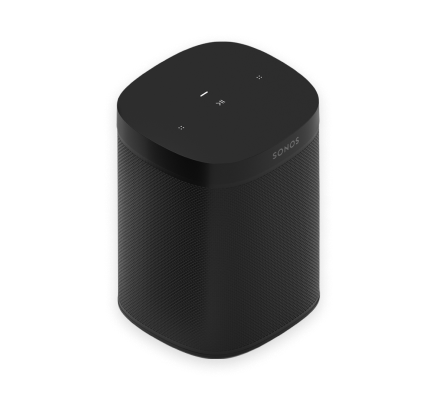
The essential speaker for businesses—
- Perfect fit for shelves, counters, and snug spaces or mounted to a wall, ceiling, or speaker stand.
- Effortless setup with just one cable.
- Pair two for left-right stereo sound.
- Control your Sonos Pro system using the Sonos S2 app or the dashboard.
- See Getting started when you’re ready to add a Sonos One to your Sonos Pro system.
Controls and lights
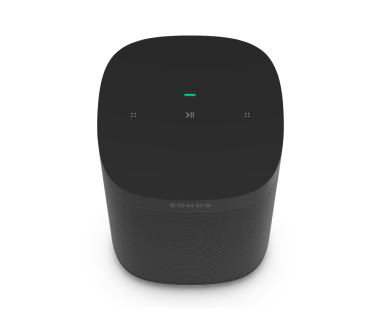 | Status light | Displays the product's connection to WiFi, indicates when the volume is muted, and signal errors. Learn more |
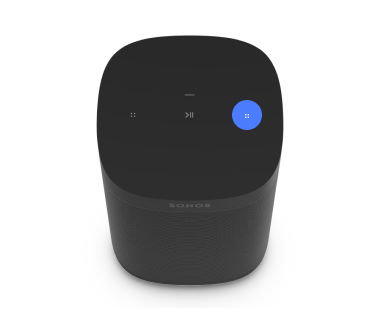 | Volume control |
Press and hold to quickly change the volume. Note: You can also use the Sonos app to adjust volume. |
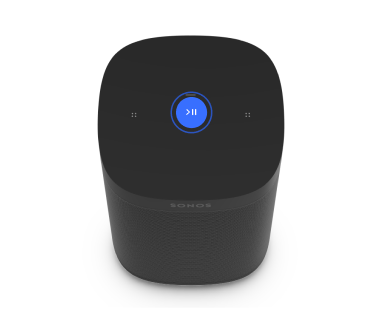 | Play/Pause |
|
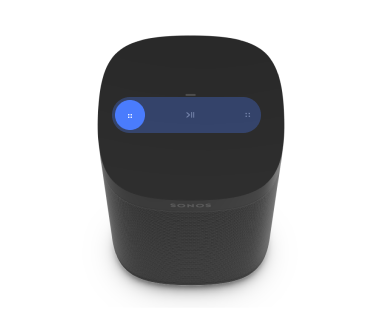 | Next/Previous |
Note: You can’t skip forward or go back when listening to a radio station. |
Note: If you don’t want to allow playback or volume adjustments using the speaker touch controls, you can disable them in the Sonos app.
Connector panel
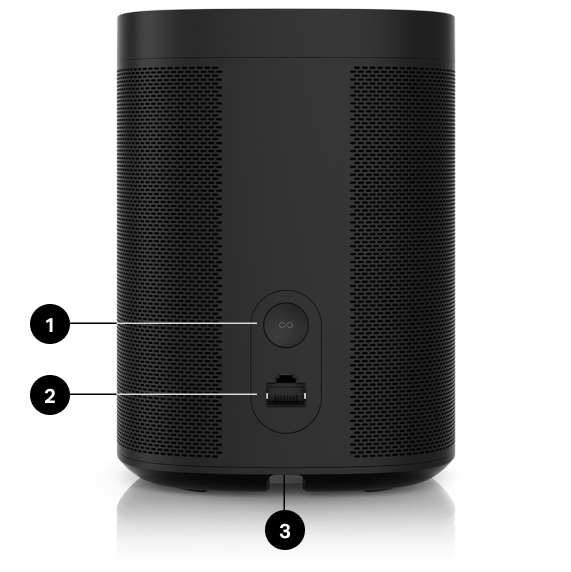
1 | Join button | Press to connect to your Sonos system during setup. |
2 | Ethernet port | Use an Ethernet cable if you want to connect to a router, computer, or network-attached storage (NAS) device (optional). |
3 | AC power (mains) input | Use only the supplied power cord (using a third-party power cord will void your warranty). Note: Insert the power cord firmly until it is flush with the bottom of the speaker. |
Select a location
You can put your speaker just about anywhere. For maximum performance, here are a few guidelines:
- Sonos One sounds great even when placed next to a wall or on a shelf. For best performance, leave at least 1" (2.5 cm) space around the back of the speaker.
- It’s humidity-resistant, but not water-resistant so don’t put it near water or leave it in the rain.
Set up stereo pair
Pair two Sonos speakers in the same area for a wider, stereo experience. One speaker serves as the left channel and one serves as the right channel.
Note: The Sonos speakers in a stereo pair must be the same type (i.e. a pair of Ones or One and One SL).
- Place the speakers 8' to 10' (2.4 m to 3 m) apart. The listening position should be 8' to 12' (2.4 m to 3.6 m) from the paired speakers—less distance increases bass, more distance improves stereo imaging.
- Go to
 > System.
 - Select one of the speakers to use in the stereo pair, then select Set Up Stereo Pair to get started.
Product settings
You can customize Sonos products using the Sonos app.
- Go to Settings
 .
. - Select a product.
| FEATURE | DESCRIPTION |
|---|---|
Product Name | If you move your speaker to a new spot, you can change its name in Settings. |
EQ | Sonos products ship with preset equalization settings. You can change the sound settings (bass, treble, balance, or loudness) to suit your personal preferences. Learn more |
Trueplay | Trueplay adapts the sound for your surroundings and content. Portable products can tune themselves automatically. Learn more |
Volume Limit | You can set a maximum volume for each product or set. Learn more |
Battery Saver (portable products only) | Set your portable speaker to power off automatically instead of going to sleep. It won't appear in the Sonos app until it’s powered back on. |
Line-In (Enable in Global Settings) | When a projector, turntable, stereo, or other audio device is connected to a Sonos product, you can adjust these line-in settings:
|
Idle Auto-Disconnect | When enabled, the speaker automatically disconnects from Bluetooth after 30 minutes of inactivity, only when it's also connected to WiFi. |
Status Light | Displays the speaker’s connection to WiFi, indicates when the volume is muted, and signals errors. Learn more |
Touch Controls | You can disable the touch control on your speaker. Do this to prevent accidental playback or volume adjustments (recommended for Sonos Pro users). Learn more Note: This setting also turns off Sonos Roam's controls. |
Turn off WiFi (not available for portable products) | You can turn off your speaker’s WiFi when it’s connected to your network with an Ethernet cable. This reduces power consumption and can improve connectivity for some wired speakers. |
Accessories
Find the perfect accessory for your Sonos system—tailored to perfectly fit your Sonos products.
For a full selection of Sonos-compatible stands, wall mounts, chargers and cables, see Accessories on our website.
Sonos One Stand
A set of custom-designed stands provides an elegant solution for placing Sonos One and One SL speakers.
- Indentation in the stem hides the speaker’s power cable for simple cable management.
- Solid construction. The base has increased structural stability to eliminate wobbling, and bumpers secure your speakers in place.
- Perfect height for home theater surrounds.
- Dimensions (H x W x D): 32.98 x 11.81 x 11.81 in. (837.8 x 300 x 300 mm)
- Weight: 12.3 lbs (5.58 kg) for the pair; 6.15 lbs (2.8 kg) each
Note: For the full selection of Sonos-compatible stands, wall mounts, and cables, see Accessories on our website.
What's in the box?
The kit contains a pair of Sonos stands. Each stand assembly includes:
- Base
- Stem
- Speaker platform
- Speaker platform bottom cover
- Stem top cap
- Mounting kit with 4 screws (2 silver, 2 black)
Note: Sonos speakers sold separately.
What you'll need
- Phillips-head screwdriver
Set it up
1 | Take everything out of the box and place the base in the packaging slot to stabilize it for the next few steps. Unplug your Sonos speaker, and thread the speaker end of the power cord through the opening in the base. | 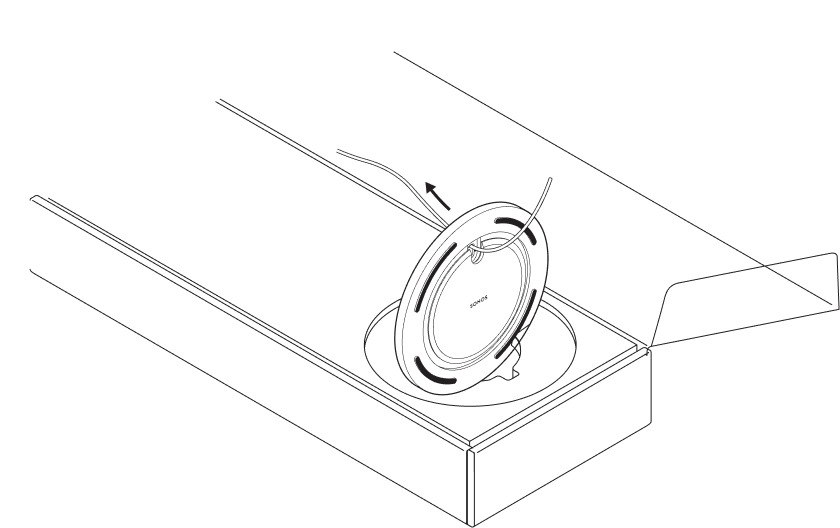 |
2 | Insert the stem snugly into the base, using the alignment pins to position the power cord channel either in the front or back. Use the 2 black screws and a Phillips-head screwdriver to attach the base. | 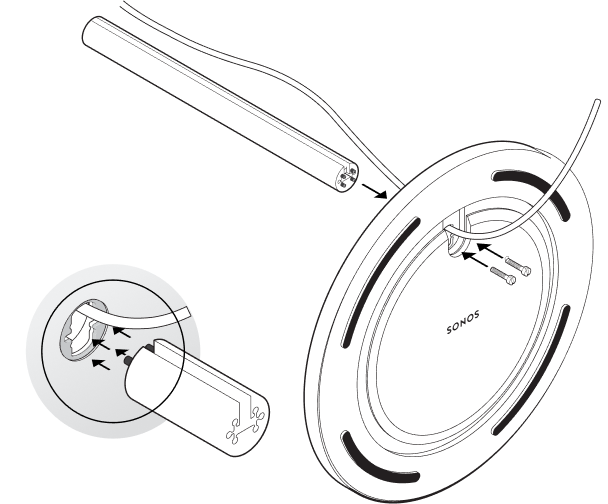 |
3 | Route the speaker’s power cord through the speaker platform. | 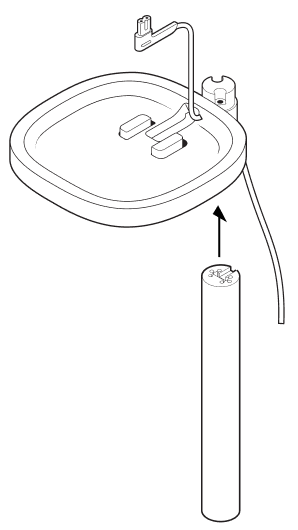 |
4 | Use the 2 silver screws to attach the speaker platform to the top of the stem, threading the power cable carefully. Snap the bottom plate on with the power cable channel in the back, and mount the platform on the stem. | 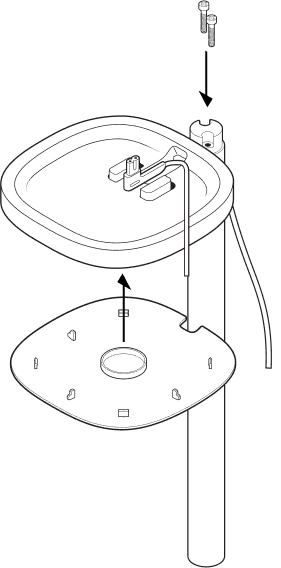 |
5 | Plug the power cord back into the speaker and place on the top mount, pulling any extra cable down from the top. Tighten the screws and attach the top cap with the notch facing toward the speaker. | 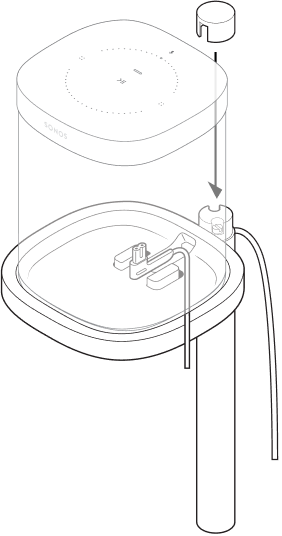 |
6 | Press the power cord into the stem, working from top to bottom. Pull the excess cable down from the base. | 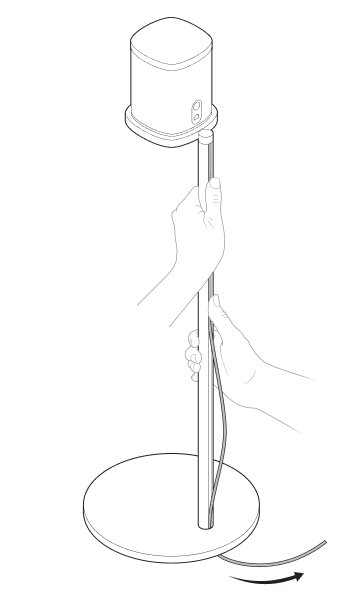 |
7 | Tilt the Stand forward slightly to wrap the excess cord around the bottom of the base. Plug the speaker’s power cable into the wall and enjoy the music! | 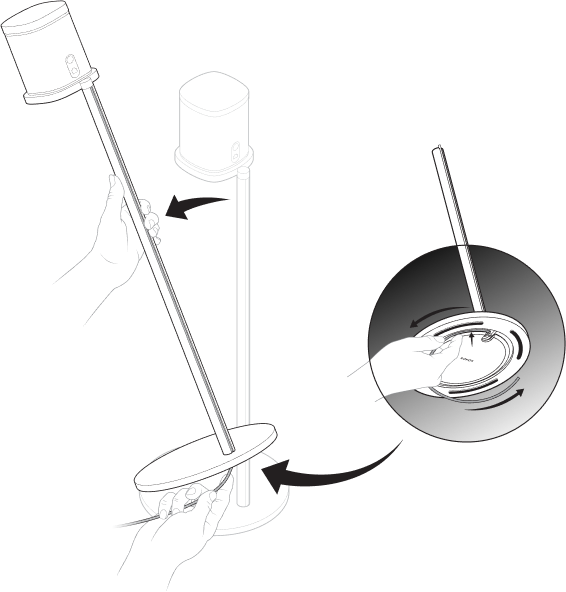 |
Sonoe One Shelf
The easy-to-install shelf for Sonos One and One SL securely holds your speaker in place—its space-saving design provides a designated space for your speaker.
- Designed to support up to 8 lbs (3.6 kg).
- Dimensions (H x W x D): 0.89 x 10.23 x 6.29 in.(22.7 x 260 x 160 mm)
- Weight: 1 lb (0.45 kg)
Note: For the full selection of Sonos-compatible stands, wall mounts, and cables, see Accessories on our website.
What's in the box?
- Top shelf
- Wall bracket
- Bottom cover
- Mounting
Note: Sonos speakers sold separately.
What you'll need
- Pencil
- Phillips-head screwdriver
- Power drill (if needed for install)
| Wall material | Pre-drill | Use wall anchors | Use screws |
|---|---|---|---|
Wood stud | 1/8” / 3 mm bit | No | Yes |
Drywall (no stud) | 5/16” / 8 mm bit | Yes | Yes |
Hard wallboard or double board | 5/16” / 8 mm bit | Yes | Yes |
Plaster | 5/16” / 8 mm bit | Yes | Yes |
Concrete or brick | 5/16” / 8 mm bit | Yes | Yes |
Set it up
1 | Place the wall bracket against the wall and mark the screw holes. (Make sure the black bracket foam ring is face up). | 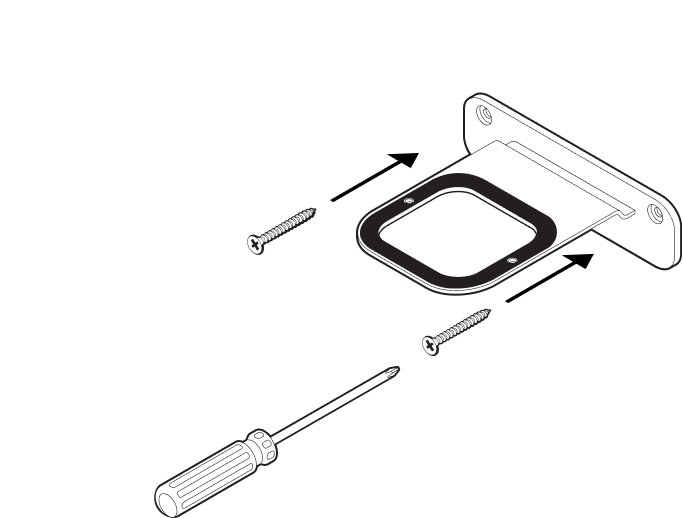 |
2 | If using wall anchors, use a 5/16" drill bit to drill 2 pilot holes and then insert the wall anchors. Refer to the wall mounting information below for guidelines. Otherwise skip this step. | 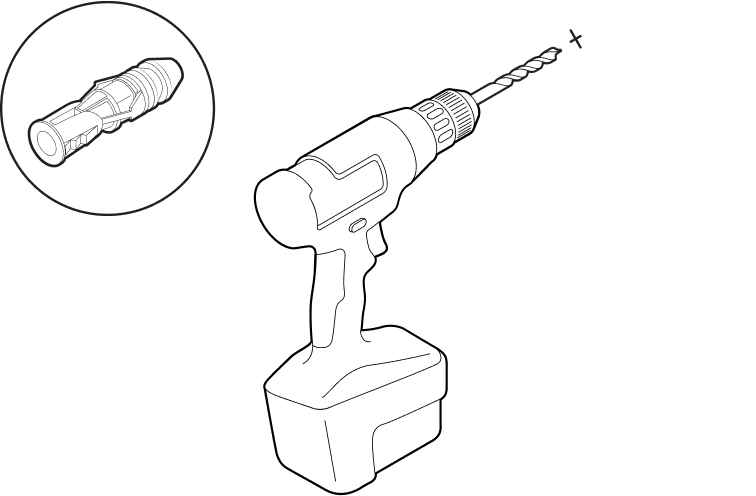 |
3 | Use a Phillips-head screwdriver or a power drill to screw the bracket to the wall. | 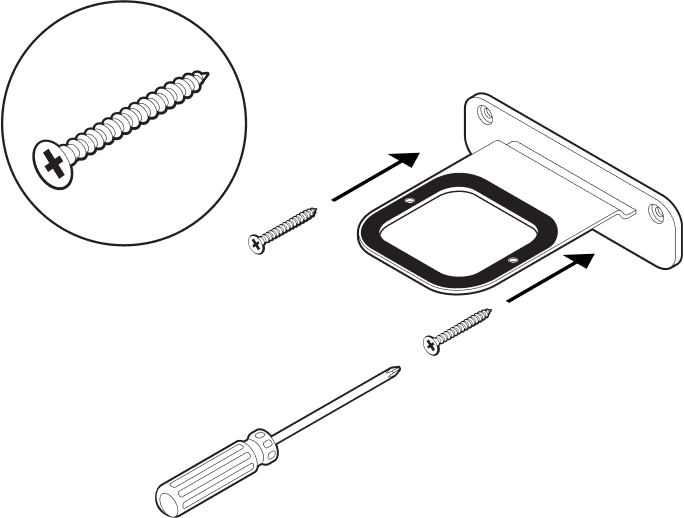 |
4 | Position the Shelf the way you want it (supports left or right speaker placement). Press the Shelf firmly on to the wall bracket until it snaps into place (both front and back). | 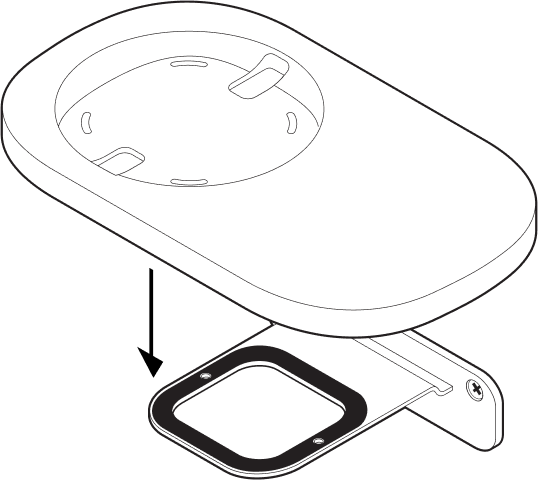 |
5 | Route the speaker’s power cord through the Shelf opening. (You’ll wrap the cord around the bottom of the Shelf after it’s assembled.) | 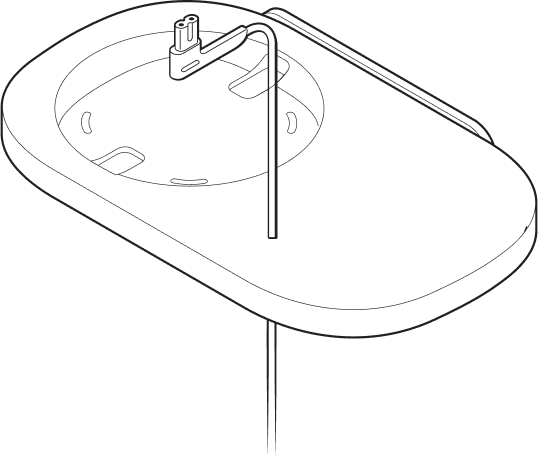 |
6 | Carefully align the pins, then press the bottom cover firmly onto the shelf until it snaps into place. Plug the power cord into the speaker and place it on top of the Shelf. | 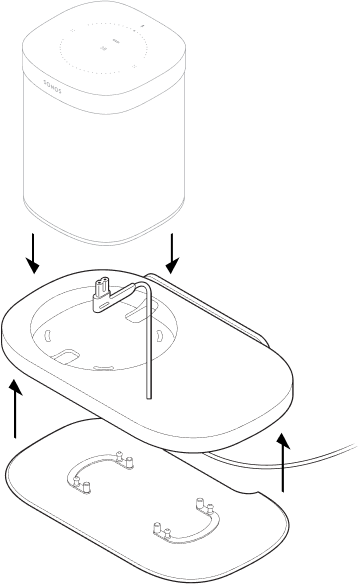 |
7 | Wrap the excess power cord around the bottom of the Shelf. | 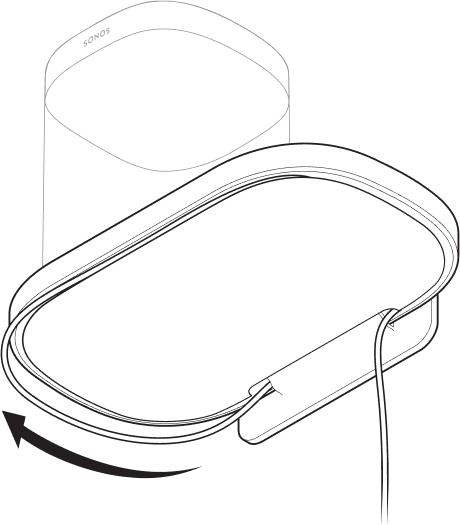 |
8 | Your Shelf assembly is complete—time to play some music! | 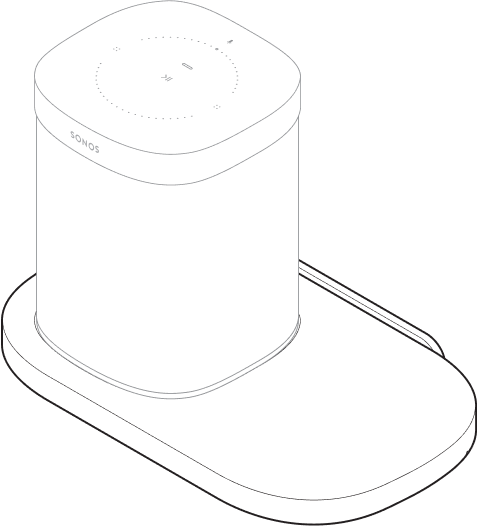 |
Sonos One Mount
- The easy-to-install mount for Sonos One and One SL.
- Holds speaker normally, upside-down, or even horizontally.
- Speaker can pivot up to 45 degrees.
- Allows access to ports, buttons, and touch controls.
- Cleanly routes your speaker’s cables.
Important: This mount is intended for use only with Sonos One and One SL.
What's in the box?
- Mount
- Wall bracket
- Top cap
- Mounting kit
Note: Sonos speakers sold separately.
What you’ll need
- Pencil
- Level
- Phillips-head screwdriver
- Power drill (if needed for installation location)
| Wall mount | Pre-drill | Use wall anchors | Use screws |
|---|---|---|---|
Wood stud | 1/8” / 3 mm bit | No | Yes |
Drywall (no stud) | 5/16” / 8 mm bit | Yes | Yes |
Hard wallboard or double board | 5/16” / 8 mm bit | Yes | Yes |
Plaster | 5/16” / 8 mm bit | Yes | Yes |
Concrete or brick | 5/16” / 8 mm bit | Yes | Yes |
Set it up
1 | Place the wall mount bracket against the wall using a level to make sure it is vertical and mark the screw holes. | 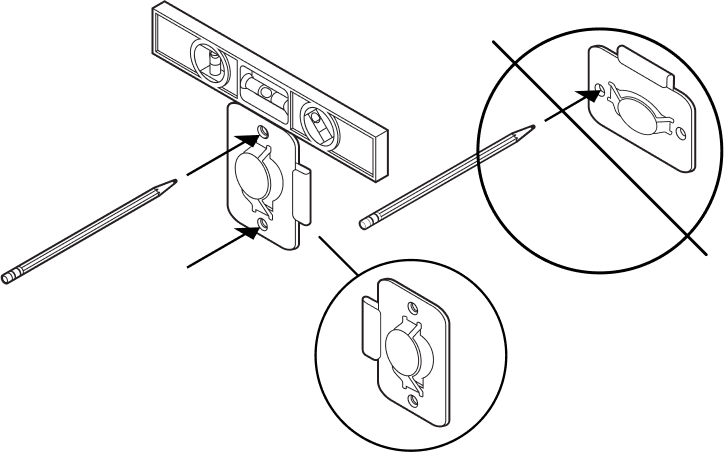 |
2 | If you're using wall anchors, use a 5/16" drill bit to drill 2 pilot holes and then insert the wall anchors. | 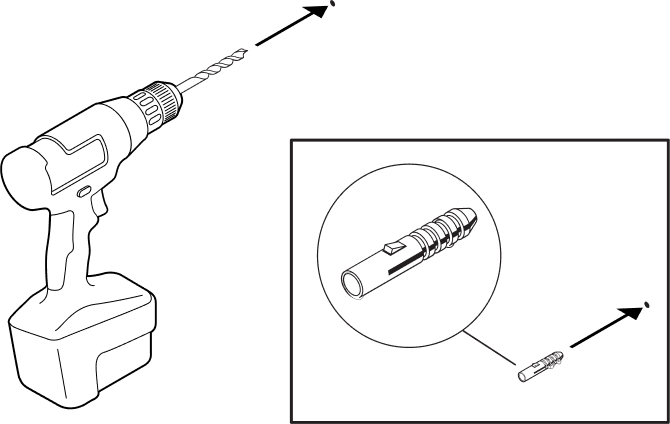 |
3 | Use a Phillips-head screwdriver or power drill to screw in the wall mount bracket. | 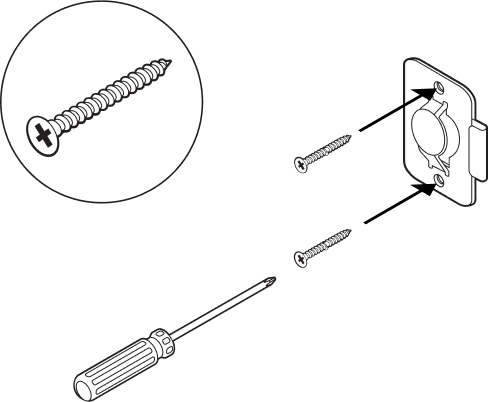 |
4 | Feed the speaker's power cord through the Mount opening and plug it into the speaker. Place it down onto the Mount. | 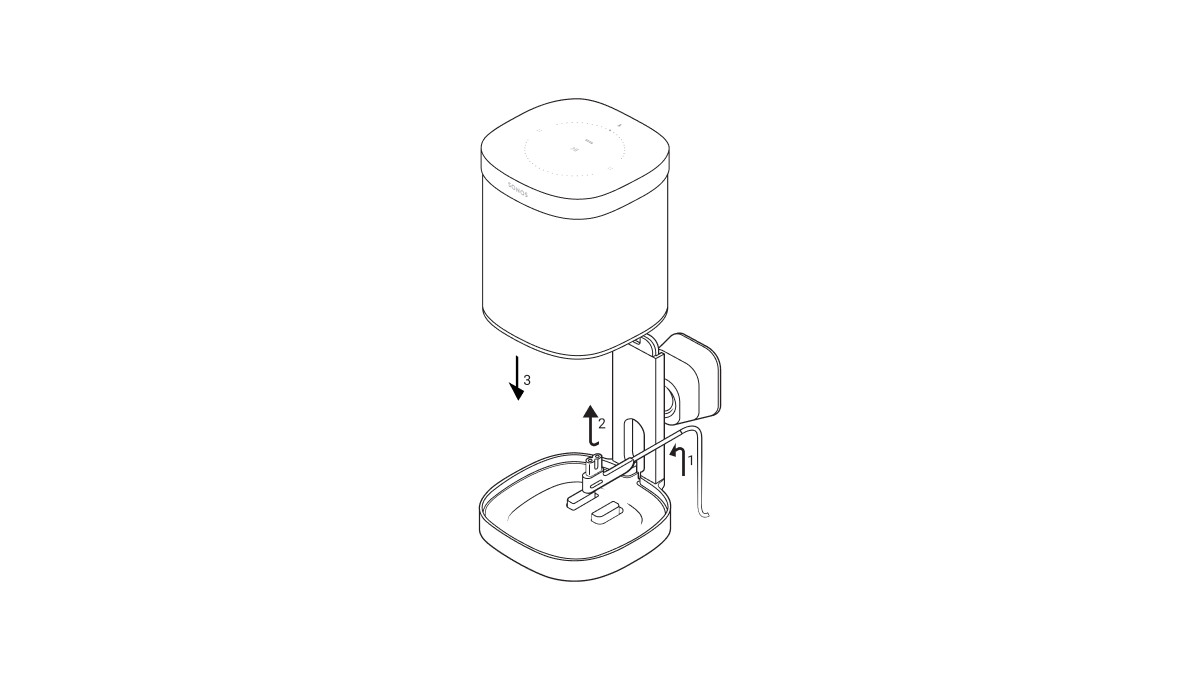 |
5 | Press the top band down firmly onto the speaker and use a Phillips-head screwdriver to screw in the top band fastener on the back. | 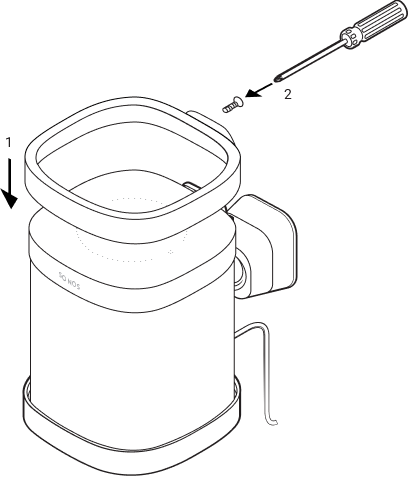 |
6 | Slide the Mount down onto the wall bracket. | 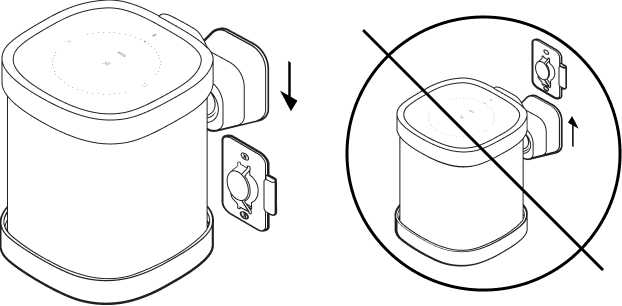 |
7 | Twist the speaker to position it in place, then turn it right to lock it in securely. Turn left to unlock. | 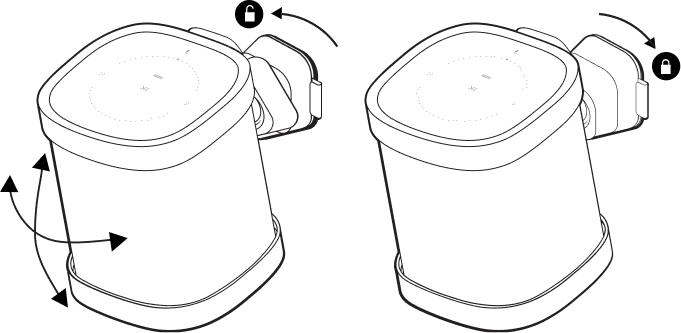 |
8 | Route the power cable into the side hook and plug the speaker into power. | 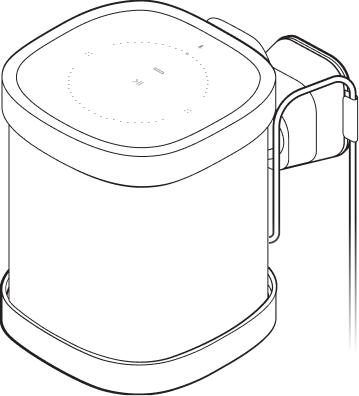 |
Set up surrounds
If you have a soundbar in your Sonos system, you can turn two speakers of the same type (i.e. a pair of Ones or a One and a One SL), or a Sonos Amp and two non-Sonos speakers, into separate right and left channels.
- Angle each surrounds towards the listening area (Sonos recommends about 10 feet from a listening position).
- Go to > System.
- Select a zone with a soundbar and choose Add Surrounds to get started.
Note: If you group the rooms or create a stereo pair instead, you won't have surround sound.
Surround audio settings
During setup, surround sound is optimized for your area. These settings are adjustable:
Surrounds | Turn surround sound On or Off. |
TV Level | Adjust surround volume for TV audio. |
Music Level | Adjust surround volume for music. |
Music Playback | Ambient (subtle) or Full (louder, full range). Doesn't apply to Dolby Atmos Music playback. |
Specifications
| Feature | Description |
|---|---|
AUDIO |
|
Amplifier | Two Class-D digital amplifiers. |
Tweeter | One tweeter creates a crisp and accurate high frequency response. |
Mid-woofer | One mid-woofer ensures the faithful playback of mid-range vocal frequencies plus deep, rich bass. |
Stereo pair | Turn two speakers into separate left and right channel speakers to create wider, deeper sound. |
Home theater | Add two speakers as surrounds for a true surround sound experience. |
NETWORKING* |
|
Wireless connectivity | Connects to WiFi network with any 802.11a/b/g/n 2.4 or 5GHz broadcast-capable router. |
Ethernet port | One 10/100 Mbps Ethernet port. You can plug a Sonos product directly into your router if your WiFi is unstable. |
GENERAL |
|
Power supply | Auto-switching 100 - 240 V ~ 50-60 Hz 1A AC universal input |
Dimensions (H x W x D) | 6.36 x 4.69 x 4.69 in. (161.45 x 119.7 X 119.7 mm) |
Weight | 4.08lb (1.85 kg) |
Operating temperature | 32° to 104°F (0 to 40°C) |
Storage temperature | -4° to 158°F (-20° to 70°C) |
Humidity resistant | Designed to withstand high humidity, like in a bathroom with a running shower. (It is not waterproof or water-resistant.) |
Product finish | White with white grille; black with black grille |
Package contents | Sonos One SL, power cord, and Quickstart Guide |
* Specifications subject to change without notice.
Important safety information
- Read these instructions.
- Keep these instructions.
- Heed all warnings.
- Follow all instructions.
- Do not use this apparatus near water.
- Clean only with dry soft cloth. Household cleaners or solvents can damage the finish on your Sonos products.
- Do not block any ventilation openings. Install in accordance with the manufacturer’s instructions.
- Do not install near any heat sources such as radiators, heat registers, stoves, or other apparatus that produce heat.
- Protect the power cable from being walked on or pinched, particularly at plugs, convenience receptacles, and the point where they exit from the apparatus.
- Only use attachments/accessories specified by the manufacturer.
- Unplug this apparatus during lightning storms or when unused for long periods of time.
- This product does not have any user-serviceable parts. Do not open or disassemble or attempt to repair it or replace any components. Refer all servicing to Sonos qualified service personnel. Servicing is required when the apparatus has been damaged in any way, such as power-supply cable or plug is damaged, liquid has been spilled or objects have fallen into the apparatus, the apparatus has been exposed to rain or moisture, does not operate normally, or has been dropped.
- The Mains plug should be readily available to disconnect the equipment.
- Warning: To reduce the risk of fire or electric shock, do not expose this apparatus to rain or moisture.
- Do not expose apparatus to dripping or splashing and do not place objects filled with liquids, such as vases, on the apparatus.