Sonos Play


Overview
Overview
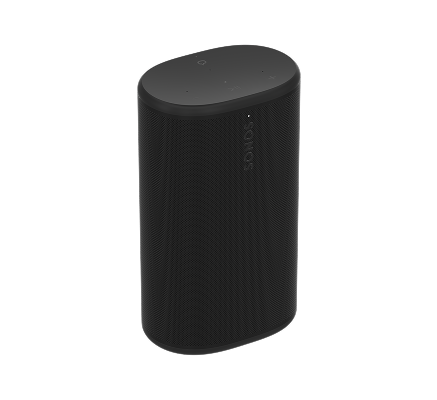
Powerful, portable, and ready for anything, Play delivers big stereo sound and all-day battery life wherever you go.
- Big sound. Just the right size. Play packs big stereo sound and deep bass in a go-anywhere design. And it automatically tunes itself so you get the best possible sound, wherever you listen.
- Battery life that goes on and on. Listen all day with up to 24 hours of playback, and recharge easily with the included charging base. Optimized power management extends every charge, and when it’s time for a new battery, replacing it is quick and easy.
- Ready for whatever your day holds. Don't sweat accidents or the elements. Play is rated IP67 for waterproof and dustproof protection, and the durable design easily handles drops and tumbles.
- Play your way, at home and away. Use WiFi for a seamless multiroom listening experience with the rest of your Sonos system at home. Connect instantly with Bluetooth® to enjoy Sonos sound anywhere. Control is easy with the Sonos app, your voice, and more.
- Group anywhere – even off the grid. Take the Sonos experience beyond your home. Easily group up to four Play speakers over Bluetooth to fill your campsite, vacation rental, or park picnic with powerful sound.
- Power more than your music. No outlet? No problem. Play doubles as a power bank so you can keep your phone charged and your playlist going, wherever life takes you.
Controls and lights
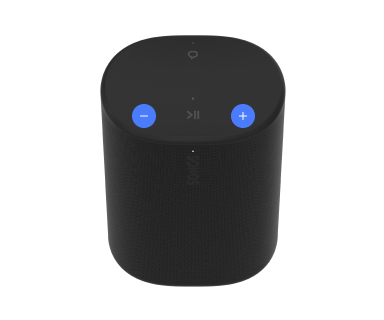 | Volume control |
Note: When music is playing, press and hold + or - to quickly change the volume. |
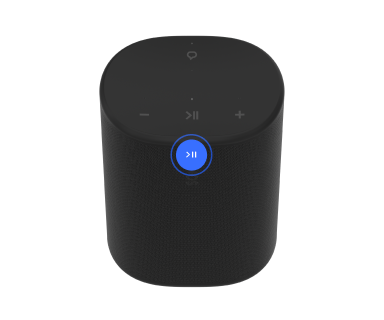 | Play/Pause |
|
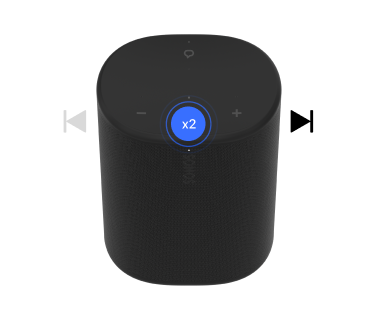 | Next |
Note: You can’t skip forward or go back when listening to a radio station. |
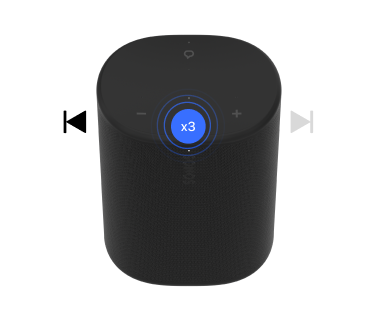 | Previous |
Note: You can’t skip forward or go back when listening to a radio station. |
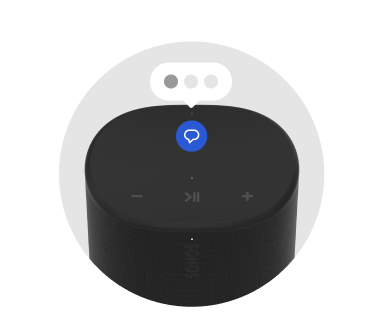 | Voice services on/off | Press the voice services button to turn voice control on or off. You can set up a voice service in the Sonos app.
Note: Make sure the universal microphone switch on the back is turned on. |
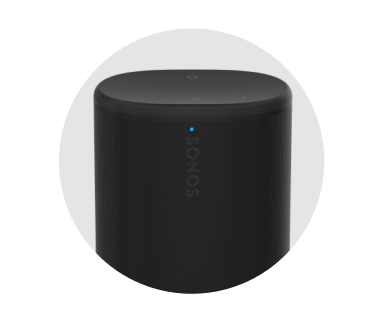 | Status light | Displays the product's connection to WiFi or Bluetooth, indicates when the volume is muted, and signals errors. Learn more |
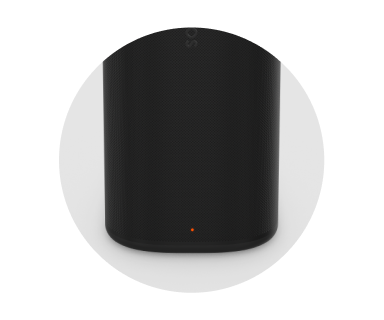 | Battery light | Indicates the battery status:
Note: Check battery level in the Sonos app. |
Connector panel
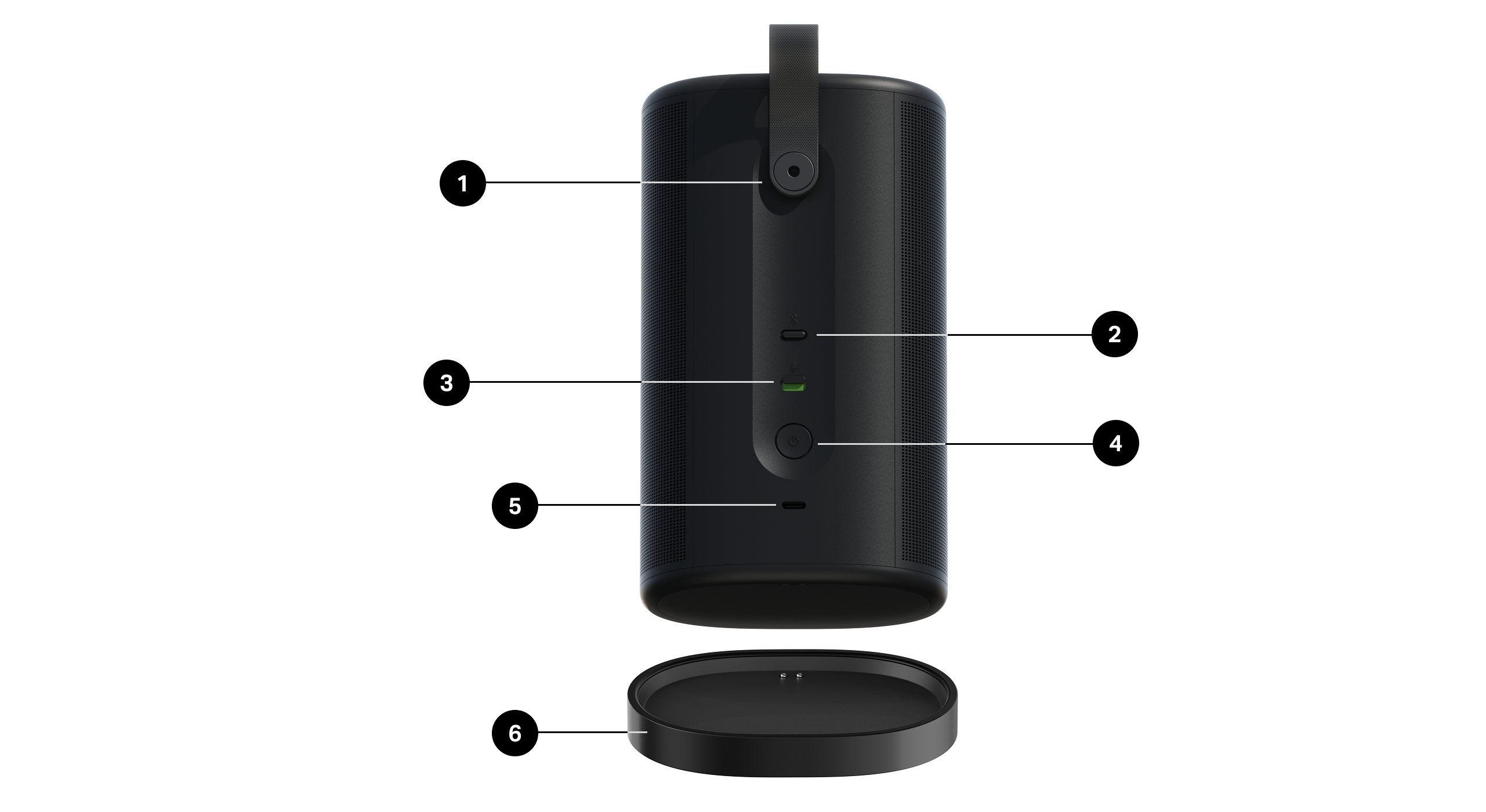
1 | Strap | Allows for easy lifting and carrying so you can take the Play wherever you go. To remove the strap, use a 2.5mm hex key. The internal thread underneath is ¼-20. |
2 | Bluetooth button | Press to connect to a mobile device via Bluetooth. Play will connect to your most recently paired device. Press again to disconnect the current device. Press and hold to pair a new device. |
3 | Universal microphone switch | Turn all microphones on or off. You can set up a voice service in the Sonos app.
|
4 | Power button | Press to power on. The status light turns on to let you know Play is active. Press to put to sleep. The status light turns off and you'll hear a short tone. Press and hold (about 10 seconds) to power off. The status light turns off and you'll hear a longer tone. Note: Play turns off automatically after 30 minutes when it's not being charged. |
5 | USB-C port |
Power bank: Play doubles as a power bank so you can keep your phone charged. |
6 | Charging dock | Set Play on the charging base and it stays active for at-home use while recharging. Note: Play is designed to work with 18W (9V/2A) USB-PD compliant adapters, but 45W (15V/3A) is recommended. Check the W rating on your power block before use. |
Charging
Charging base | Set Play on its charging base for easy recharging. The battery light will turn on for 10 seconds to let you know Play is seated correctly (make sure the charging contacts are touching). The charging base is for indoor use only—be sure to keep it dry. Note: Check battery level in the Sonos app. |
USB-C port | Play is designed to be used with a USB-C compliant USB-PD power supply (45W recommended, ≥ 18W (9V, 2A) minimum). Play can charge your phone or power other devices via USB-C connection. |
Battery Saver
Battery Saver preserves battery life when Play is inactive. When enabled, your Play will power off automatically after 10 minutes in sleep mode. You can turn Battery Saver off in the Sonos app.
Go to Settings  , and select Play to get started.
Note: Play won't appear in the Sonos app until it’s powered back on.
Bluetooth pairing
- Turn Bluetooth on in your device settings.
- Press and hold the Bluetooth button on the back of the speaker until you hear a tone, then release. The status light blinks blue when the speaker is ready to pair.
- Choose Play from the list of available devices in your Bluetooth settings. Your mobile device will automatically connect next time you press the Bluetooth button.
Select a location
You can put your Play just about anywhere. For maximum performance, here's a few guidelines:
- For best performance, leave at least 1" (2.5 cm) space around the back of Play when placing it next to a wall or shelf.
- It’s ultra durable. With a tough outer shell and IP67 rating, Play is built to withstand falls, bumps, moisture, dust, UV rays, and extreme temperatures (charging base is for indoor use only).
- Enable auto Trueplay™ in the Sonos app—Play can tune itself for amazing sound no matter where you are and what you’re listening to.
- Don’t use or store your Sonos speaker upside down.
Microphone on/off
The microphones in Play are used for voice control and other features found in the Sonos app, like auto Trueplay™.
The voice services button on top quickly toggles voice control on and off for privacy without affecting the microphones needed for auto Trueplay and other microphone-related features.
The universal microphone switch on the back allows you to turn on or off all microphones in the speaker and adds an extra level of privacy when you want it (it's turned on by default). When disabled, auto Trueplay and other microphone-related features will be unavailable.
When the voice services light is on:
- If you set up voice control, it's ready to listen.
- The universal microphone switch is on.
When the voice services light is off:
- If you set up voice control, it's not available.
- The universal microphone switch could be on or off.
Voice services
Use your voice to control your Sonos system with any voice-enabled Sonos product—play and control content, turn the volume up or down, and more.
- Sonos Voice Control: control your whole Sonos system with hands-free ease and unmatched privacy. Sonos Voice Control comes ready to use—it only takes a few seconds to add when you set up your speakers. Use play controls, check your battery level, and more. Learn more.
- Amazon Alexa: you’ll need the Sonos app and the Alexa app with the Sonos skill enabled. You’ll make some changes in both apps during setup. Learn more.
- Siri: you’ll need the Apple Home app. Add your AirPlay 2-compatible Sonos speakers to the Apple Home app and then use an iPhone, iPad, or Apple TV to ask Siri to play music (currently limited to Apple Music). Learn more.
Note: Voice control isn’t supported in every country yet—this feature will be available as soon as Sonos and a voice service launch together in your region.
Trueplay™
Every room is different. Trueplay tuning measures how sound reflects off walls, furnishings, and other surfaces in a room, then fine tunes your Sonos speaker to make sure it sounds great no matter where you've placed it.
Trueplay works on iOS mobile devices running iOS 8 or later. During tuning, you'll move around the room holding your mobile device.
- Select Settings
 .
. - Choose the product you want to tune.
- Select Trueplay to get started.
Auto Trueplay
Portable Sonos products like Sonos Roam and Move can tune themselves automatically. Auto Trueplay uses your speaker’s microphone to detect the environment and make periodic tuning adjustments so you get great sound wherever your speaker is and whatever you're listening to.
- Select Settings .
- Choose the product you want to tune.
- Select Trueplay, and turn on Auto Trueplay.
Set up stereo pair
Pair two Sonos speakers in the same room for an even wider stereo effect. One speaker acts as the left channel and the other as the right channel.
Note: the Sonos speakers in a stereo pair must be of the same type.
- Place the speakers 2.5 to 3 meters apart. Your favorite listening position should be 2.5 to 3.5 meters from the paired speakers — less distance enhances the bass, more distance improves the stereo imaging.
- Open the Sonos app and go to Settings
- Choose one of the products you want to use in the stereo pair.
- Select Set up stereo pair to begin.
Product settings
You can customize Sonos products for your surroundings.
- Go to Settings .
- Select a product.
Room Name | If you move your speaker to a new room, you can change its name in Settings. |
Turn off WiFi (not available for Sonos Era 100, Era 300, or portable products) | You can turn off your speaker’s WiFi when it’s connected to your network with an Ethernet cable. This reduces power consumption and can improve connectivity for wired speakers.
Note: WiFi is turned off for Era 100 and Era 300 when you connect a Sonos Combo Adapter using the Ethernet cable. |
EQ | Sonos products ship with preset equalization settings. You can change the sound settings (bass, treble, or loudness) to suit your personal preferences. Learn more |
Trueplay | Trueplay adapts the sound for your surroundings and content. Portable products can tune themselves automatically. Learn more |
Volume Limit | You can set a maximum volume for each room. Learn more |
Status Light | Displays the speaker’s connection to WiFi, indicates when the volume is muted, and signals errors. Learn more Note: If the light is distracting, you can turn it off in Settings. |
Touch Controls | You can disable the touch control on your speaker. You may want to do this to prevent a child or curious pet from accidentally adjusting playback or volume. Learn more |
Battery Saver (portable products only) | To save battery life, you can set your portable speaker to power off automatically instead of going to sleep. It won't appear in the Sonos app until it’s powered back on. |
Line-In (Sonos products with line-in capability) | When a projector, turntable, stereo, or other audio device is connected to a Sonos product, you can adjust these line-in settings:
|
Grouping out of the home
You can group your Play and Move 2 speakers on the go. When your speakers are close together, start playing content
You can press and hold the play/pause button on your speakers to add them to or remove them from a group.
Drying your Play
Play has an IP67 rating—dustproof and water resistant and can be submerged in water up to 3 ft (1 meter) for several minutes.
- If your speaker is submerged in any liquid other than tap or rain water (e.g. pool, ocean, beer) flush the speaker with tap water, then give it a quick shake.
- Position the speaker vertically until it drains, then place it face down (logo side down) on a dry towel for a few minutes.
- Start some music to help drive moisture out of the acoustic drivers.
- Let the speaker air-dry to remove any excess water. Make sure Play is fully dried off in between uses. Don't use a hair dryer or other forced hot air to dry your product.
Important: Don’t play audio when the speaker is immersed in water.
Specifications
| FEATURE | DESCRIPTION |
|---|---|
Audio | |
Amplifiers | Three Class-H digital amplifiers. |
Tweeters | Two angled tweeters create a crisp and accurate high frequency response and stereo separation. |
Woofers | One midwoofer ensures the faithful playback of mid-range vocal frequencies and deep bass. |
Microphones |
|
Voice |
Enable in the Sonos app. Note: The universal microphone switch must be turned on. |
Auto Trueplay™ | This software continually optimizes the speaker's sound for its environment and the audio content playing. Enable in the Sonos app. Note: The universal microphone switch must be turned on. |
Adjustable EQ | Use the Sonos app to adjust:
|
Power & Connectivity |
|
Charging base | USB-C PD power with 18W (9V/2A) to 45W (15V/3A) Output: 18-45W (9-15V) Note: A power supply is not included with Play. |
Battery (replaceable) | Capacity: 4800 mAh Replacement: Visit our website for more information. Disposal: Check with your local waste or recycling company to determine the proper disposal method in your area. |
WiFi | Using Sonos S2: Connects to WiFi with any 802.11a/b/g/n/ac/ax 2.4/5 GHz broadcast-capable router. Wi-Fi Activation/Deactivation:
(Wi-Fi disable only available when Sonos Play has an Ethernet connection.) |
Bluetooth | Bluetooth 5.3 supports audio streaming from any Bluetooth enabled device. Press the Bluetooth button to pair with a Bluetooth device. Bluetooth Activation/Deactivation: |
USB-C | Connect an audio source using an auxiliary cable and the Sonos Line-In Adapter. Connect your router with an Ethernet cable and the Sonos Combo Adapter. (Accessories sold separately.) |
Charging | The power delivered by the charger must be between min 18 Watts required by the radio equipment, and max 45 Watts in order to achieve the maximum charging speed. |
CPU | Quad Core 4x A55 1.4 GHz |
Details & Dimensions |
|
Dimensions (H x W x D) | 7.59 x 4.43 x 3.05 in (193 x 113 x 77 mm) |
Weight | 2.86 lb (1.3 kg) (includes battery) |
Operating temperature | 32° to 104° F (0° to 40° C) |
Storage temperature | -13° to 158° F (-25° to 70° C) |
Humidity resistant | Play meets IP67 water and dust resistance levels. Note: The charging base is for indoor use only. |
Colors | Matte black |
What's in the box? | Play, charging base with 6 ft (2 m) USB-C to C cable, and Quickstart guide. |
Important safety information
Caution: Danger of explosion if battery is incorrectly replaced. Replace only with the same or equivalent type.
- Read these instructions.
- Keep these instructions.
- Heed all warnings.
- Follow all instructions.
- Clean only with a dry soft cloth. Household cleaners or solvents can damage the finish on your Sonos products.
Sonos products with rubber rings on the bottom, such as Move, Move 2, One, and One SL, and Play may leave a faint ring on some surfaces treated with polyurethane. This ring can be easily removed by wiping with a damp cloth.
- Do not install near any heat sources such as radiators, heat registers, stoves, or other apparatus that produce heat.
- Do not expose batteries (battery pack or batteries installed) to excessive heat such as sunshine or fire.
- Protect the power cable from being walked on or pinched, particularly at plugs, convenience receptacles, and the point where they exit from the apparatus.
- Only use attachments/accessories specified by the manufacturer.
- Unplug this apparatus during lightning storms or when unused for long periods of time.
- Refer all servicing to Sonos qualified service personnel. Servicing is required when the apparatus has been damaged in any way.
- Sonos Play meets IP67.